Workflows, AI workflows, and AI agents: when to use each
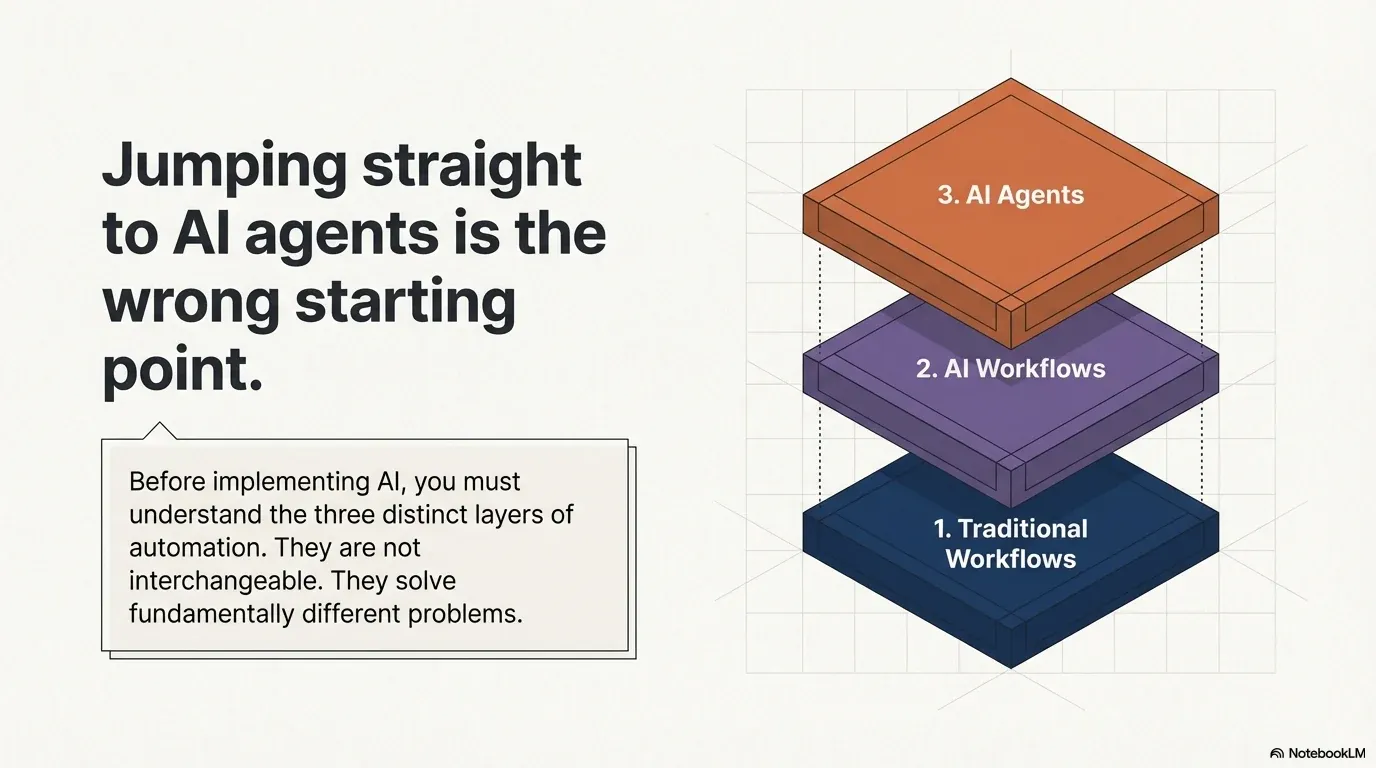
Before choosing an automation tool, work out which steps you can define in advance and which need interpretation or judgment. Three common approaches are:
- Traditional workflows
- AI workflows
- AI agents
The examples below show where each approach fits.
Traditional Workflows
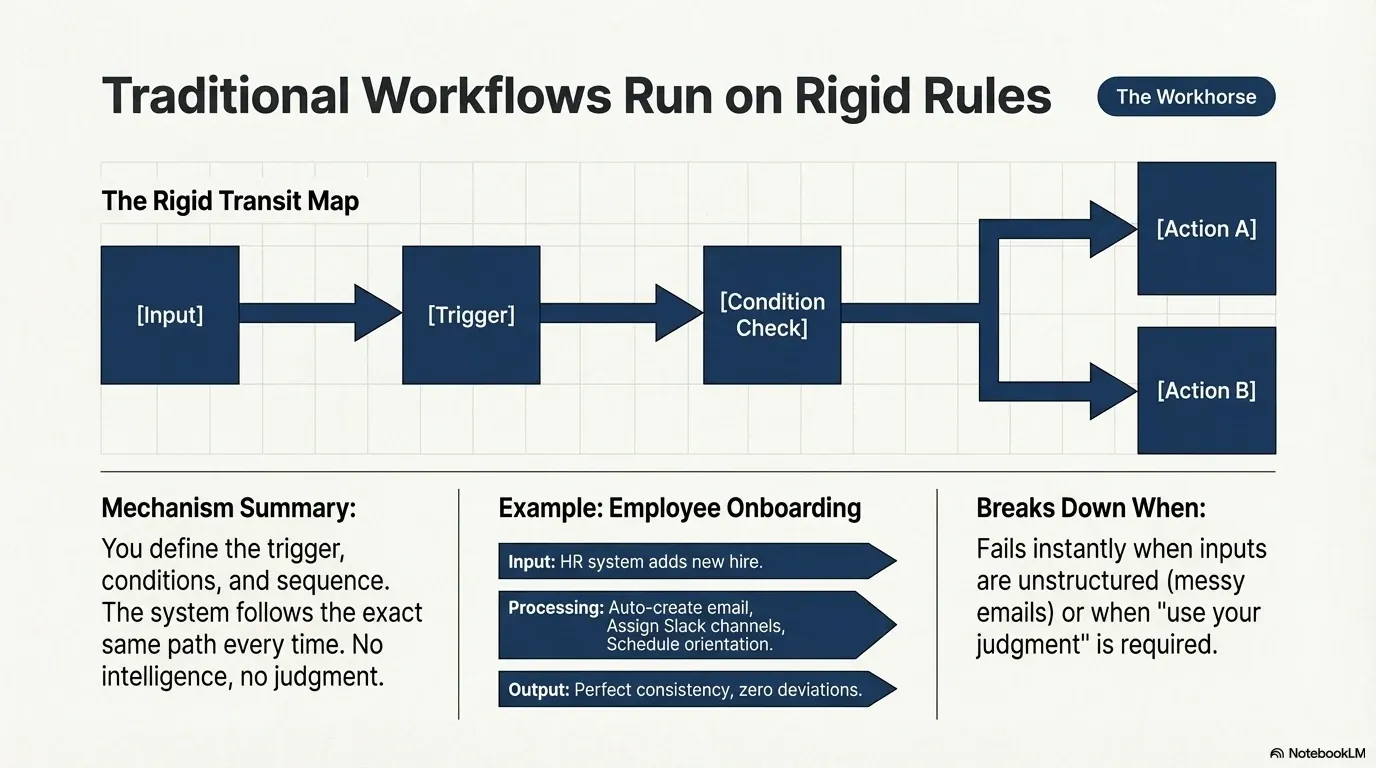
Traditional workflows are rule-based automation. You define a trigger, a set of conditions, and a sequence of actions. The system follows the same path every time.
This works well when the rules are clear and the process repeats.
What traditional workflows are good at
- Processes that repeat the same way every time
- High-volume tasks where consistency matters more than flexibility
- Anything where the rules are clear and do not change based on context
- Compliance-driven operations where you need an audit trail
Real examples
Employee onboarding: New employee is added to the HR system. The workflow automatically creates their email account, sends a welcome message, assigns them to the right Slack channels, schedules orientation meetings, and notifies the manager. Every step is predefined. Nothing requires judgment.
Invoice processing (simple case): An invoice arrives via email. The workflow reads the structured fields (amount, vendor, date), matches it to a purchase order, and routes it for approval based on the amount. Under $500 goes to the team lead. Over $500 goes to the department head. Over $5 000 goes to finance.
E-commerce order fulfillment: A customer places an order. The workflow checks inventory, reserves the items, generates a shipping label, notifies the warehouse, sends the customer a confirmation email, and schedules a delivery status update. Same steps, every single order.
CRM lead routing: A new lead fills out a form on your website. The workflow assigns it to a sales rep based on region and deal size, creates a task in the CRM, sends an internal Slack notification, and triggers a follow-up email sequence after 24 hours.
IT ticket escalation: A support ticket is submitted. If it is not resolved within 4 hours, escalate to level 2. If still not resolved in 12 hours, escalate to the team lead. If it involves a security keyword, skip the queue and go straight to the security team.
The tools
Zapier, Make (formerly Integromat), n8n, Power Automate, Xano task schedulers, simple cron jobs, or even just well-structured database triggers.
When traditional workflows break down
They fail when:
- The inputs are unstructured (free-text emails, scanned documents, voice messages)
- The rules are not clear-cut (“use your judgment” is not a rule)
- The process needs to adapt based on context
- You cannot define every possible path in advance
These tasks may need an AI step or human input.
AI Workflows
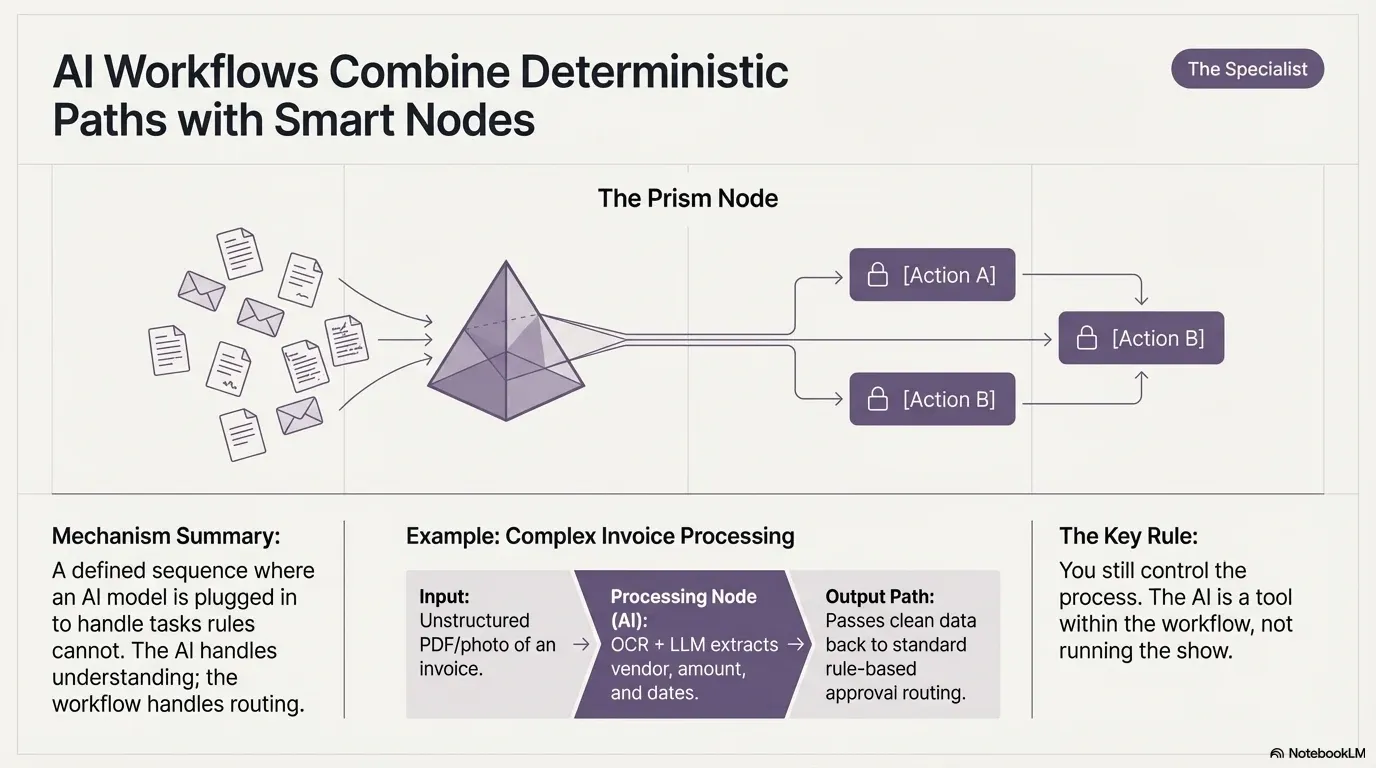
AI workflows are still automated sequences. They still follow a defined path. But one or more steps in that path use a machine learning model to handle something that rules alone cannot.
The workflow itself is still deterministic. You still control the sequence. But the AI step handles the part that requires understanding, classification, extraction, or generation.
This is a useful starting point when an existing process has one step that needs AI.
What AI workflows are good at
- Processing unstructured data (documents, images, audio, free-text)
- Classification tasks (sorting, categorizing, routing based on content)
- Extraction tasks (pulling specific information out of messy inputs)
- Translation and summarization
- Quality checks that need pattern recognition
Real examples
Invoice processing (complex case): Invoices come in as PDF scans, email attachments, or photos. No two look the same. An AI model (OCR + language model) extracts the vendor name, invoice number, line items, amounts, and dates. Once extracted, the data flows into the same rule-based approval workflow as before. The AI handles the messy part. The workflow handles the routing.
Customer support email triage: Emails come in from customers. An AI model reads the email and classifies it: billing issue, technical problem, feature request, complaint, or spam. Based on the classification, a traditional workflow routes the email to the right team, sets the priority, and sends an auto-acknowledgment. The AI does the reading. The workflow does the routing.
Resume screening: Hundreds of resumes come in for a job posting. An AI model reads each one and extracts: years of experience, relevant skills, education, and language proficiency. It scores each resume against the job requirements. Resumes above a threshold get forwarded to the hiring manager. The rest get a polite rejection email. The AI does the reading and scoring. The workflow handles the next steps.
Document compliance check: A legal team receives contracts from vendors. An AI model scans each contract and flags clauses that deviate from the company’s standard terms: unusual liability limits, non-standard payment terms, or missing data protection clauses. Flagged contracts go to the legal review queue. Clean contracts go to the signing queue. The AI does the reading. The workflow handles the routing.
Sentiment analysis on customer feedback: Customer reviews come in from multiple channels. An AI model reads each review and assigns a sentiment score: positive, neutral, or negative. Negative reviews with specific product mentions trigger an alert to the product team. Positive reviews with high engagement get forwarded to marketing for potential testimonials.
Image-based quality control: In a manufacturing line, a camera captures an image of each product. An AI model checks the image for defects: scratches, dents, color mismatches, or missing components. Defective items get flagged and diverted. Good items continue down the line. The AI does the visual inspection. The workflow handles the sorting.
Automated data extraction from government forms: A company receives various government or regulatory forms (tax documents, permits, registration papers). The forms are scanned or uploaded as PDFs. An AI model extracts the relevant fields: registration numbers, dates, names, amounts. The extracted data is then validated against internal records using rule-based checks and routed for filing or further processing.
How the steps fit together
The AI reads, classifies, extracts, or generates content at a defined step. Your rules determine what happens before and after it.
The tools
LLM APIs (OpenAI, Anthropic, Google) called within workflow tools like n8n, Make, or custom code. Vision models for image tasks. Speech-to-text models for audio. OCR tools for document scanning. All of these plugged into a workflow as a single step.
When AI workflows are not enough
They fail when:
- The task requires multiple steps of reasoning, not just one classification
- The system needs to decide which tools or APIs to use based on context
- The process is not linear: it branches, loops, or adapts in ways you cannot predefine
- The task requires interacting with multiple systems and making decisions along the way
That is when you start thinking about agents.
AI Agents
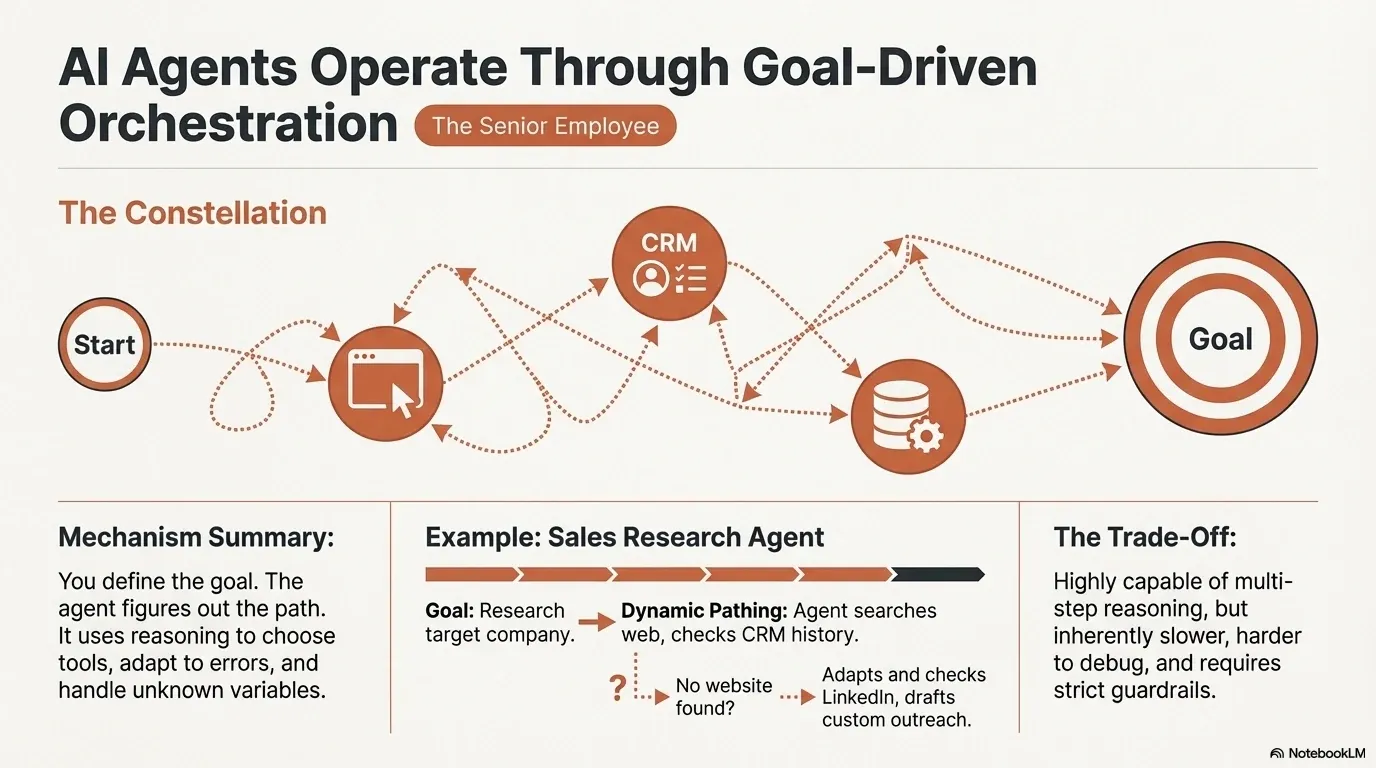
An AI agent chooses steps toward a goal rather than following a fully predefined sequence.
An agent has access to tools (APIs, databases, file systems, web browsers, other models) and uses reasoning to decide which tools to use, in what order, and how to interpret the results.
It can adjust its plan as it gets results. That also makes its behavior less predictable, harder to debug, and more expensive to run.
What AI agents are good at
- Tasks where the steps are not known in advance
- Work across several systems (pulling data from one place, processing it, and pushing it to another based on context)
- Tasks that require planning and reasoning across multiple steps
- Situations where the agent needs to recover from errors or adapt its approach
- Complex research, analysis, or decision support
Real examples
Sales research agent: A sales rep enters a company name. The agent searches the web for the company’s recent news, checks LinkedIn for key decision-makers, looks up their tech stack on BuiltWith, checks CRM for any past interactions, and generates a personalized outreach draft. Each step depends on the previous one. If the company has no website, the agent adjusts. If there are past interactions, it incorporates them. No two runs look the same.
IT incident response agent: A monitoring system detects that an API is returning errors. The agent checks the error logs, identifies the affected service, checks recent deployments for changes, looks at the database for unusual load patterns, and either proposes a fix or rolls back the last deployment. It escalates to a human if the issue is outside its confidence level.
Financial analysis agent: An analyst asks: “Compare our Q3 revenue across product lines to industry benchmarks.” The agent queries the internal database for revenue data, searches for industry reports, extracts relevant benchmarks, normalizes the data for comparison, generates a summary with charts, and highlights where the company is above or below average. Each step depends on what it finds in the previous one.
Customer support agent (complex cases): A customer writes: “I ordered product X last week, but I received product Y, and the charge on my card is wrong.” The agent looks up the order, checks the shipping records, verifies the charge, determines whether a refund or replacement is needed, initiates the appropriate process, and responds to the customer. It needs to interact with the order system, the payment system, and the shipping system, making decisions at each step.
Legal contract negotiation assistant: A company receives a vendor contract. The agent reads the contract, compares it clause by clause against the company’s standard terms, identifies deviations, drafts suggested counter-clauses, checks past negotiations with the same vendor for precedent, and generates a summary for the legal team with recommended actions.
Recruitment sourcing agent: A hiring manager defines a role: “Senior backend engineer, 5+ years, experience with PostgreSQL and Python, based in Europe.” The agent searches LinkedIn, GitHub, and Stack Overflow for candidates matching the criteria. It checks each candidate’s recent activity, open source contributions, and public profile. It ranks candidates by fit and generates a shortlist with notes on why each person was selected.
Data pipeline troubleshooting agent: A data engineer reports that a dashboard is showing stale data. The agent checks the ETL pipeline status, identifies which job failed, reads the error logs, checks the source database for connectivity issues, retries the failed job, and verifies the data is fresh. If the root cause is a schema change in the source database, it flags it and suggests a migration.
The risks
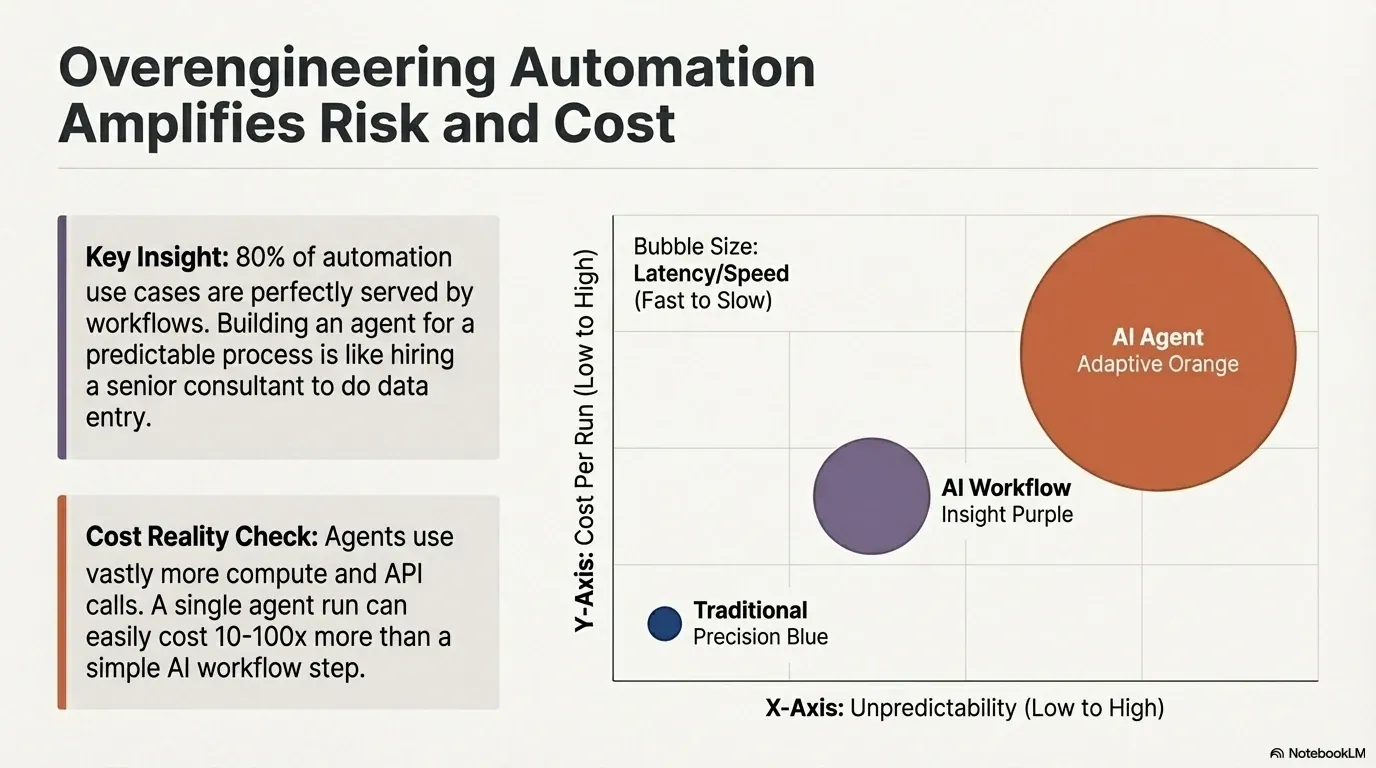
Consider these trade-offs before using an agent:
- Unpredictability: You cannot guarantee the exact sequence of steps. Two identical requests might be handled differently.
- Cost: Agents use more API calls, more tokens, and more compute. A single agent run can easily cost 10-100x what a simple AI workflow step costs.
- Debugging: When something goes wrong, tracing the agent’s decision path is harder than debugging a workflow.
- Trust: Giving an agent access to real systems (databases, payment processors, email) means you need strong guardrails. A bad decision from an agent can have real consequences.
- Latency: Agents are slower. They reason, they plan, they retry. A task that takes a workflow 2 seconds might take an agent 30 seconds or more.
When agents make sense
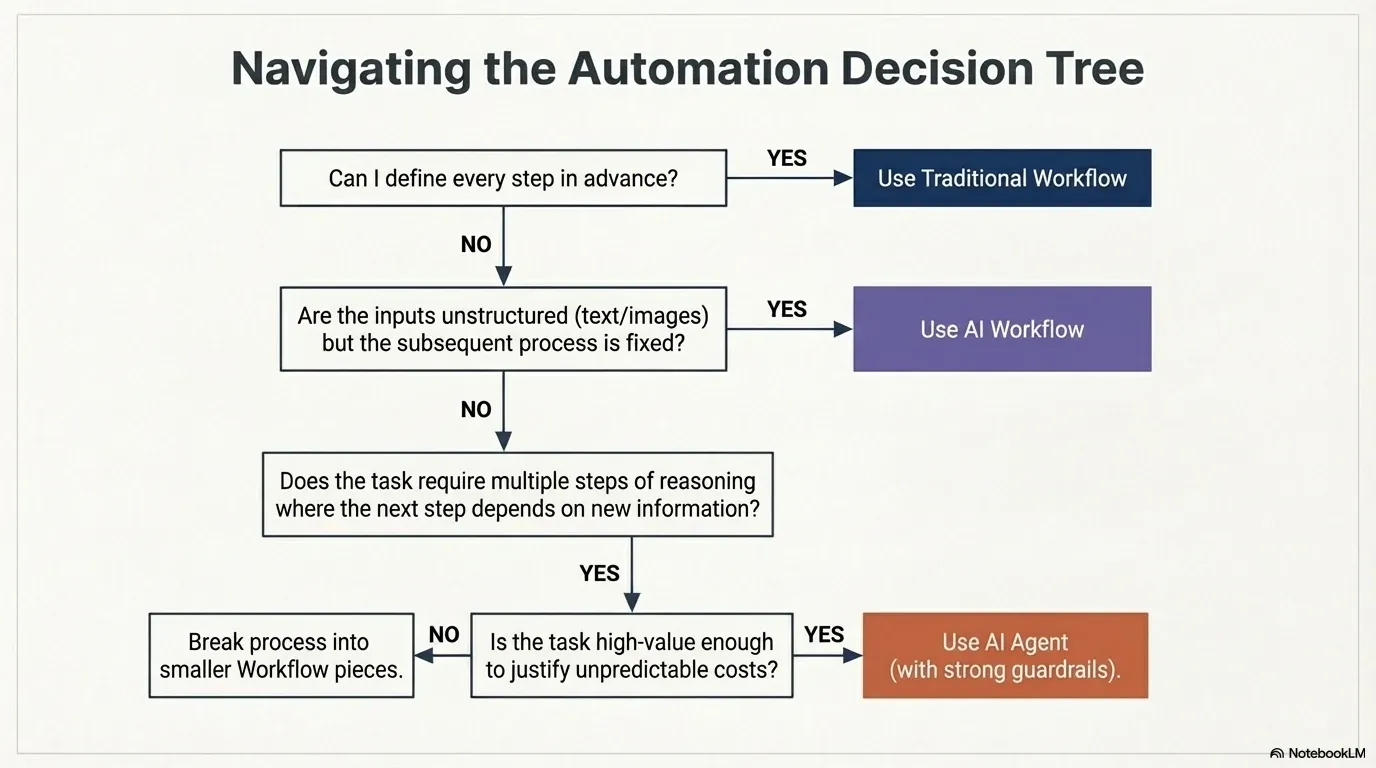
Use agents when:
- The value of the task justifies the cost and complexity
- The task cannot be broken down into a fixed sequence
- You have clear limits and approval rules and monitoring in place
- You are okay with some level of unpredictability
- The alternative is a human spending significant time doing the same thing
Do not use agents when a workflow or AI workflow would do the job. Overengineering automation is a real problem.
How the Three Layers Work Together
In practice, most companies will use a combination of all three.
A company might combine them like this:
Level 1 — Traditional workflows handle the bulk: routing, notifications, scheduling, data syncing, simple approvals.
Level 2 — AI workflows handle the tasks that need understanding: document processing, classification, extraction, summarization. They pass their result back to the workflow.
Level 3 — AI agents handle the complex, variable tasks that need reasoning: research, multi-step analysis, incident response, adaptive decision-making. Use them where a fixed workflow cannot handle the task.
A concrete example of all three working together
Imagine a customer service operation:
-
Traditional workflow: A customer submits a ticket. The workflow logs it, assigns a ticket number, and sends a confirmation.
-
AI workflow step: An AI model reads the ticket and classifies it: billing, technical, or general inquiry. Based on the classification, the workflow routes it to the right team.
-
AI workflow step: For billing tickets, an AI model extracts the key details: account number, disputed amount, date range.
-
Traditional workflow: The extracted data is matched against the billing system. If it is a simple overcharge under $50, an automatic refund is issued and the customer is notified.
-
AI agent: For complex billing disputes (multiple charges, contract disagreements, escalations from unhappy customers), an agent takes over. It reviews the full account history, checks contract terms, looks at previous interactions, and drafts a resolution proposal for a human reviewer.
The Decision Framework
When deciding which approach to use, ask these questions:
Can I define every step in advance? Yes → Traditional workflow.
Are the inputs structured and predictable? Yes → Traditional workflow.
Do I need to process unstructured data (text, images, audio) but the rest of the process is predictable? Yes → AI workflow.
Does the task require one smart step (classify, extract, summarize) within an otherwise fixed process? Yes → AI workflow.
Does the task require multiple steps of reasoning where the next step depends on what the system learns? Yes → Consider an AI agent.
Is the task high-value enough to justify the cost and complexity of an agent? Yes → AI agent with clear limits and approval rules. No → Break it into smaller pieces and use workflows or AI workflows.
Common Mistakes
1. Using an agent when a workflow would work
A traditional or AI workflow may be enough when the steps are known in advance. Using an agent for a fixed sequence adds cost and complexity without a clear benefit.
2. Skipping the AI workflow layer
Some companies jump from “we have no automation” to “we want AI agents.” They skip the entire middle layer. The result is usually an overbuilt, expensive system for tasks that could have been solved with a simple workflow plus one AI step.
3. Not defining guardrails for agents
Agents without guardrails are dangerous. If your agent has access to your production database, your email system, and your payment processor, you need to define clear boundaries: what it can do, what it cannot do, and when it must escalate to a human.
4. Treating AI workflows as agents
An AI workflow that classifies an email is not an agent. It is a workflow with an AI step. The distinction matters because workflows are predictable and agents are not. If you build something that is actually a workflow but call it an agent, you are setting the wrong expectations.
5. Automating before understanding the process
This applies to all three layers. If you do not understand the process well enough to explain it clearly, you are not ready to automate it. Map the process first. Then decide which layer fits.
Where to Start
If you are just getting started with automation:
-
Start with traditional workflows. Automate the repetitive, predictable stuff first. This gives you the biggest return for the least effort.
-
Add AI workflow steps where inputs are messy. If a step in your process requires reading unstructured data, add an AI model to handle that step. Keep everything else as a workflow.
-
Only build agents for tasks that genuinely need them. Complex, multi-step, reasoning-heavy tasks where the path is not known in advance. And even then, start with a narrow scope and expand gradually.
Choose the simplest approach that can handle the task reliably.